
A personal finance app is software that connects to your bank accounts, tracks your spending, helps you build a budget, and shows your net worth in one place. The best personal finance apps in 2026 are Monarch Money, YNAB, Copilot Money, Quicken Simplifi, Empower, Rocket Money, EveryDollar, PocketGuard, and Goodbudget. Prices range from free to about $109 per year.
Most people don’t have a money problem. They have a visibility problem. Your salary lands in one account, your bills leave from another, and your credit card quietly grows in the background. Without a clear view, it is hard to make good choices.
That is exactly what a personal finance app fixes. In this guide, you will learn how these apps work, which features matter, how much they cost, and which one fits your life. You will also get a simple 30-day setup plan and answers to the most common questions.
Key Takeaways (Quick Answer)
- A personal finance app tracks income, spending, bills, savings goals, debts, and net worth automatically.
- Best overall for automatic tracking: Monarch Money.
- Best for changing spending habits: YNAB (You Need A Budget).
- Best for Apple users: Copilot Money.
- Best low-cost option: Quicken Simplifi.
- Best free option: Empower Personal Dashboard.
- Best for cutting subscriptions: Rocket Money.
- Always check the security basics: encryption, two-factor authentication, and read-only bank access.
- The “best” app is the one you will open every week, not the one with the most features.
What Is a Personal Finance App?
A personal finance app is a mobile or web tool that helps you manage your money. It pulls data from your bank accounts, credit cards, loans, and investments. Then it sorts each transaction into a category, such as groceries, rent, or fuel.
In simple terms, it replaces the messy spreadsheet and the shoebox of receipts. You see where your money goes without doing the math yourself.
Most apps cover the same core jobs:
- Budgeting: set spending limits for each category.
- Expense tracking: record every purchase automatically.
- Net worth tracking: add up assets and subtract debts.
- Goal setting: save for an emergency fund, a trip, or a home.
- Bill reminders: avoid late fees.
The idea is not new. Personal finance has always been about planning, saving, and spending wisely. What has changed is the tooling. In 2024, the popular app Mint shut down, and millions of users had to look for a replacement, as Mint’s history shows. That event reshaped the whole category and pushed newer apps forward.
How Does a Personal Finance App Work?
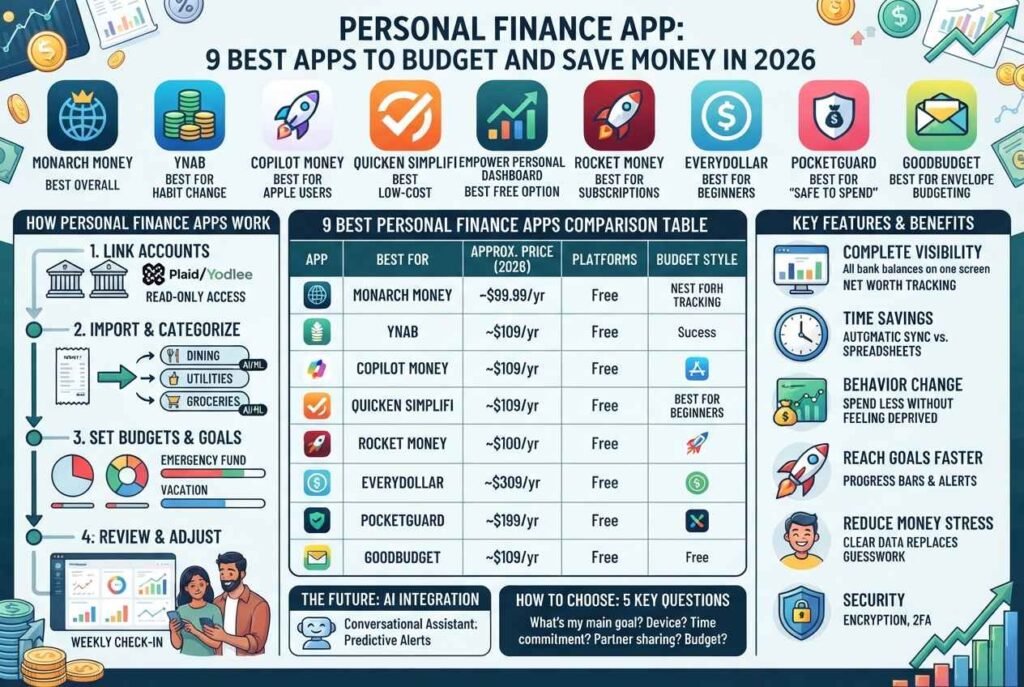
Understanding the basics helps you trust the tool and use it better. Here is the typical flow.
Step 1: You link your accounts
Most apps use a third-party data aggregator to connect to your bank. Companies such as Plaid, Yodlee, and Finicity do this work. You log in through a secure window, and the app receives read-only data.
Read-only means the app can see your transactions. It cannot move your money.
Step 2: The app imports and categorizes transactions
Once connected, the app pulls in recent transactions. Then it uses rules and machine learning to assign each one a category. A coffee shop becomes “Dining,” and a power bill becomes “Utilities.”
You can fix mistakes, and the app learns from your edits.
Step 3: You set budgets and goals
Now you decide how much to spend in each category. Some apps suggest a plan. Others let you build it from scratch.
Step 4: You review dashboards and alerts
The app shows charts, trends, and alerts. For example, it may warn you when dining spend reaches 80% of your limit. Over time, you spot patterns you never noticed before.
Step 5: You adjust and improve
A budget is a living plan. Each month, you review results and make small changes. That habit is where the real savings come from.
Types of Personal Finance Apps
Not every app solves the same problem. Knowing the type saves you from paying for features you don’t need.
1. Budgeting apps
These focus on planning. YNAB and EveryDollar are good examples. They ask you to give every dollar a job before you spend it.
2. Expense trackers
These focus on where money went. They are lighter and easier to maintain, so they suit beginners.
3. All-in-one money dashboards
These combine budgeting, investments, debt, and net worth in one view. Monarch Money and Empower fit here.
4. Bill and subscription managers
Rocket Money is the well-known name. It finds recurring charges and helps you cancel the ones you don’t use.
5. Saving and investing apps
Apps like Acorns and Betterment automate saving and investing. They are less about budgeting and more about growing wealth.
6. Debt payoff apps
These build a plan to clear credit cards or loans using the snowball or avalanche method.
Many modern apps blend several types. Still, choosing by your main goal keeps things simple.
Benefits of Using a Personal Finance App
Why bother with an app at all? Here are the most practical benefits.
You see the full picture
Your accounts live in different places. An app puts them on one screen. As a result, you always know your real balance after upcoming bills.
You save time
Manual tracking takes hours each month. Automatic sync cuts that to minutes.
You spend less without feeling deprived
Awareness alone changes behavior. When you see that subscriptions cost $70 a month, you tend to cancel a few.
You reach goals faster
Goals with a target amount and date are more likely to be met. Apps make that progress visible.
You reduce money stress
Financial uncertainty is stressful. One 2026 roundup of budgeting apps cites a survey finding that 84% of Americans feel stress about money because they are unsure where it goes (Online Tool Guides). Clear data replaces guesswork.
You build a habit of reviewing money
The biggest benefit is behavioral. A weekly five-minute check-in beats a stressful yearly cleanup.
Features to Look For in a Personal Finance App
Feature lists can be long. Focus on the ones that affect daily use.
Reliable account syncing
If your bank connection breaks every week, you will quit. Look for apps known for stable connections.
Smart categorization
Good categorization saves the most time. Check whether you can create custom rules.
Flexible budgeting style
Some apps use zero-based budgeting, where income minus planned spending equals zero. Others use flexible category targets. Pick the style that matches your personality. You can read more about the method in this overview of zero-based budgeting.
Net worth and investment tracking
Even if you don’t invest today, you might later. Choose an app that grows with you.
Goal tracking
Look for named goals, target dates, and progress bars.
Recurring bill and subscription detection
This feature alone can pay for the app.
Partner and household sharing
Couples need shared visibility. Not every app supports it well.
Platform support
Check that the app runs on your device. Some apps are Apple-only, and others work on web, iOS, and Android.
Security controls
Look for bank-level encryption, biometric login, and two-factor authentication.
Fair pricing
Compare monthly and yearly prices. Then check what the free trial includes.
9 Best Personal Finance Apps in 2026
Below is our shortlist. Prices reflect recent reviews and can change, so confirm on each official site before you subscribe.
1. Monarch Money: Best Overall
Monarch Money is a full financial dashboard. It tracks spending, investments, real estate, and net worth. It also supports shared household access, which makes it a strong pick for couples.
- Price: About $99.99 per year or $14.99 per month for the Core plan, according to NerdWallet’s budget app roundup. A higher Plus tier costs more.
- Platforms: Web, iOS, Android.
- Pros: Broad features, shared budgets, strong reports, and popular with former Mint users.
- Cons: Higher price than some rivals, and it is better at tracking than at forcing discipline.
Best for: People who want one complete dashboard.
2. YNAB (You Need A Budget): Best for Changing Habits
YNAB is built on a simple rule: give every dollar a job. You budget only the money you actually have. That rule breaks the paycheck-to-paycheck cycle for many users.
- Price: About $109 per year or $14.99 per month, with a 34-day free trial reported by recent reviews.
- Platforms: Web, iOS, Android.
- Pros: Powerful method, great education, and excellent for debt payoff.
- Cons: It takes effort. You must categorize and reconcile transactions.
Best for: People who want to change how they spend, and who don’t mind daily engagement.
3. Copilot Money: Best for Apple Users
Copilot Money is known for its clean design and smart categorization. It supports investments and net worth tracking with a minimal interface.
- Price: Around $13 per month or $95 per year, based on recent reviews.
- Platforms: Apple-focused (iPhone, iPad, Mac), with a web version reported by some reviewers. Check current availability.
- Pros: Beautiful interface, strong automation.
- Cons: Limited platform support, and no true couples mode.
Best for: iPhone users who value design and automation.
4. Quicken Simplifi: Best Low-Cost Option
Simplifi by Quicken offers spending plans, bill tracking, and savings goals at a lower yearly price. It also lets you invite a partner or advisor.
- Price: Roughly $71.88 per year, according to a 2026 comparison.
- Platforms: Web, iOS, Android.
- Pros: Affordable, easy to start, good account connections.
- Cons: Some users report occasional miscategorized expenses.
Best for: Budget-conscious users who want solid basics.
5. Empower Personal Dashboard: Best Free Option
Empower offers a free dashboard that tracks net worth, spending, and investments. It is especially useful for people with retirement accounts.
- Price: Free.
- Platforms: Web, iOS, Android.
- Pros: No cost, strong investment tools.
- Cons: Empower is also an advisory firm, so expect sales calls about paid services.
Best for: Investors who want free net worth tracking.
6. Rocket Money: Best for Subscriptions
Rocket Money finds recurring charges and helps you cancel them. It also offers bill negotiation and basic budgeting.
- Price: Free tier plus optional premium plans.
- Platforms: Web, iOS, Android.
- Pros: Fast savings on subscriptions.
- Cons: Budgeting depth is lighter than YNAB or Monarch.
Best for: People who suspect they pay for things they don’t use.
7. EveryDollar: Best for Beginners
EveryDollar uses a simple zero-based, envelope-style budget. It is popular with fans of Dave Ramsey’s approach to debt payoff.
- Price: Free version, with a paid tier for bank syncing.
- Platforms: Web, iOS, Android.
- Pros: Easy to learn, low friction.
- Cons: Automatic sync requires the paid plan.
Best for: First-time budgeters.
8. PocketGuard: Best for “Safe to Spend” Clarity
PocketGuard focuses on one question: how much can I safely spend today? It subtracts bills, goals, and essentials from your income.
- Price: Free and paid tiers.
- Platforms: iOS, Android.
- Pros: Simple daily number, quick setup.
- Cons: Less detailed reporting.
Best for: People who overspend on small daily purchases.
9. Goodbudget: Best for Envelope Budgeting
Goodbudget digitizes the classic envelope method. You divide income into virtual envelopes and spend only what is inside.
- Price: Free plan with limits, plus a paid plan.
- Platforms: Web, iOS, Android.
- Pros: Great for shared budgets and cash-style discipline.
- Cons: More manual than automatic apps.
Best for: Couples and families who like a hands-on system.
Personal Finance App Comparison Table
| App | Best For | Approx. Price | Platforms | Budget Style |
|---|---|---|---|---|
| Monarch Money | All-in-one dashboard | ~$99.99/yr | Web, iOS, Android | Flexible / zero-based |
| YNAB | Habit change | ~$109/yr | Web, iOS, Android | Zero-based |
| Copilot Money | Apple users | ~$95/yr | Apple-focused | Flexible |
| Quicken Simplifi | Low cost | ~$71.88/yr | Web, iOS, Android | Spending plan |
| Empower | Free net worth tracking | Free | Web, iOS, Android | Tracking |
| Rocket Money | Subscriptions | Free + premium | Web, iOS, Android | Basic |
| EveryDollar | Beginners | Free + paid sync | Web, iOS, Android | Zero-based |
| PocketGuard | Safe-to-spend | Free + paid | iOS, Android | Simple |
| Goodbudget | Envelope method | Free + paid | Web, iOS, Android | Envelope |
Prices are approximate and based on 2026 reviews such as Engadget’s budgeting app guide. Always verify on the official website.
How to Choose the Right Personal Finance App
Use this simple five-question test.
Question 1: What is my main goal?
- Spend less: choose YNAB or PocketGuard.
- See everything in one place: choose Monarch or Empower.
- Cut subscriptions: choose Rocket Money.
- Pay off debt: choose YNAB, EveryDollar, or Goodbudget.
Question 2: What device do I use?
If you use Android, skip Apple-only apps. If you work on a laptop, confirm a strong web version exists.
Question 3: How much time will I give it?
Be honest. If you only have five minutes a week, pick an automatic tracker. If you can give ten minutes a day, a hands-on method like YNAB can change your results.
Question 4: Do I share money with a partner?
If yes, look for shared access and clear ownership tags.
Question 5: What is my budget for the app?
A paid app that saves you $50 a month is worth it. Still, a free app you actually use beats a paid app you ignore.
Pro tip: Use free trials. Try two apps for two weeks each, then keep the one you opened most.
30-Day Setup Plan for Your First Personal Finance App
A tool only works if you use it. Follow this plan.
Days 1–3: Connect and clean
- Create your account and turn on two-factor authentication.
- Link your checking, savings, and credit card accounts.
- Review the first transactions and fix wrong categories.
Days 4–7: Understand your baseline
- Look at last month’s spending by category.
- Highlight your top three spending categories.
- List your fixed bills and due dates.
Days 8–14: Build your first budget
Start with a simple framework such as 50/30/20. That means 50% needs, 30% wants, and 20% savings and debt. You can test numbers with a budget calculator from NerdWallet. Adjust the split to fit your reality.
Days 15–21: Set goals
- Emergency fund: aim first for one month of expenses, then build toward three to six months.
- Debt: list balances and interest rates.
- Savings: name one fun goal so the plan feels rewarding.
Days 22–30: Build the habit
- Pick a weekly review day, such as Sunday evening.
- Spend ten minutes checking categories, alerts, and upcoming bills.
- At day 30, review what worked and adjust limits.
For extra learning, the U.S. government’s Consumer Financial Protection Bureau offers free budgeting tools and guides.
Are Personal Finance Apps Safe?
Safety is the top concern, and it is a fair one. Here is what to check.
Read-only access
Reputable apps use read-only connections. They see transactions but cannot make transfers.
Encryption
Look for encryption of data in transit and at rest. Trusted apps state this clearly in their security pages.
Two-factor authentication and biometrics
Turn these on. A strong password plus a second factor blocks most account takeovers.
Aggregator transparency
Understand which aggregator the app uses. NerdWallet explains that budget apps typically rely on third-party aggregators to pull your data.
Your safety checklist
- Use a unique password and a password manager.
- Enable two-factor authentication.
- Never share your bank login by email or message.
- Review connected apps in your bank settings every few months.
- Watch statements for unusual activity.
- Learn the warning signs of fraud through the FTC’s IdentityTheft.gov guide.
Also remember that deposits at insured banks are protected by the FDIC, though that protects your deposits, not your data. Your own habits matter most.
Free vs Paid Personal Finance Apps
Should you pay? It depends on your needs.
When free is enough
- You mostly want to see spending and net worth.
- You are new to budgeting and testing the habit.
- You already have a spreadsheet and want light automation.
When paid makes sense
- You want dependable syncing and better categorization.
- You need shared household access.
- You want planning tools that change behavior, such as YNAB’s method.
- You want ad-free software that does not sell you products.
A quick value test
Divide the yearly price by 12. If the app helps you avoid one late fee, cancel one subscription, or trim one impulse purchase each month, it likely pays for itself.
Common Mistakes to Avoid
- Choosing by hype. Popular does not mean right for you.
- Setting an unrealistic budget. Start with what you actually spend, then improve gradually.
- Ignoring the app after week one. Schedule a weekly review.
- Never fixing categories. Small corrections make the automation smarter.
- Forgetting irregular expenses. Add yearly costs, such as insurance and gifts, to your plan.
- Skipping security. Always use two-factor authentication.
- Tracking without acting. Data is only useful if it changes a decision.
- Paying for too many tools. One well-used app beats three neglected ones.
The Future: AI in Personal Finance Apps
Artificial intelligence is changing this category fast. Many apps now use it for smarter categorization, natural-language search, forecasting, and personalized nudges. Copilot Money, for example, has publicly discussed AI-powered features such as smart goals, chat, and benchmarking, according to Engadget’s coverage.
Expect these trends to grow:
- Conversational assistants: ask, “How much did I spend on food last month?” and get an instant answer.
- Predictive alerts: warnings before an overdraft, not after.
- Personalized savings suggestions: based on your income pattern.
- Open banking growth: better, safer data connections between banks and apps.
AI can support decisions, but it does not replace judgment. Treat suggestions as input, and review anything that affects big financial choices.
Frequently Asked Questions (FAQs)
What is the best personal finance app in 2026?
There is no single winner. Monarch Money is the strongest all-rounder, YNAB is best for changing habits, Copilot suits Apple users, Simplifi is the value pick, and Empower is a strong free option.
Is there a completely free personal finance app?
Yes. Empower’s personal dashboard is free, and EveryDollar and Goodbudget have free versions. Free versions may limit bank syncing or features.
Are personal finance apps safe to use?
Reputable apps use encryption and read-only bank connections. Still, you should enable two-factor authentication, use unique passwords, and review your connected apps regularly.
Can a personal finance app help me get out of debt?
Yes. Apps such as YNAB, EveryDollar, and Goodbudget help you track balances and direct extra cash toward payoff. Combine the app with a clear method, such as the debt snowball or avalanche.
What replaced Mint?
Mint shut down in 2024. Many former users moved to Monarch Money, Rocket Money, YNAB, Copilot, or Simplifi, depending on their needs.
How much does a personal finance app cost?
Prices range from free to about $109 per year. Monarch, YNAB, Copilot, and Simplifi typically fall between roughly $70 and $110 annually. Confirm current pricing on official sites.
Which personal finance app is best for couples?
Monarch Money and Goodbudget are often recommended for shared budgets. Simplifi also lets you invite a partner. Check each app’s sharing features before you commit.
What is the difference between a budgeting app and a personal finance app?
A budgeting app focuses on planning spending. A personal finance app is broader and may include net worth, investments, goals, and bill tracking. Many apps do both.
How often should I check my finance app?
A quick weekly review of about ten minutes works for most people. If you use a hands-on method like YNAB, brief daily check-ins work better.
Do I need an app if I already use a spreadsheet?
Not necessarily. A spreadsheet works if you enjoy it and stay consistent. An app adds automatic syncing, alerts, and mobile access, which many people find easier to maintain.
A personal finance app will not fix your finances by itself. It gives you something more valuable: clear, honest information so you can decide with confidence.
Start simple. Decide your main goal, pick one app from the list above, and use its free trial. Then follow the 30-day plan and review your numbers each week. Small, steady actions beat big, occasional efforts.
If you want deeper control, try YNAB. If you want a complete picture, try Monarch Money. If you want zero cost, start with Empower. Whichever app you choose, the real win is opening it regularly and acting on what you see.
Ready to take control of your money? Pick one app today and connect your first account.